
When developing new WordPress sites sometimes its expedient to develop them under the same cPanel account and then swap to them later, but this usually ends up leaving previous versions of your website in the file structure, often they'll remain live and accessible at URLS like dev.yourdomain.com.au or staging.yourdomain.com.au, and even if you can't reach them directly because of DNS or other factors - bots can (poisoned DNS), and they look for these legacy sites to infect and stage an attack on other properties that perhaps ARE accessible to the public.
These additional dormant copies of your websites can be sitting in your cPanel account for years without being noticed. In order to reduce your risks and ensure your website and email continue to work unhindered please run the Wordpress Tools scan;
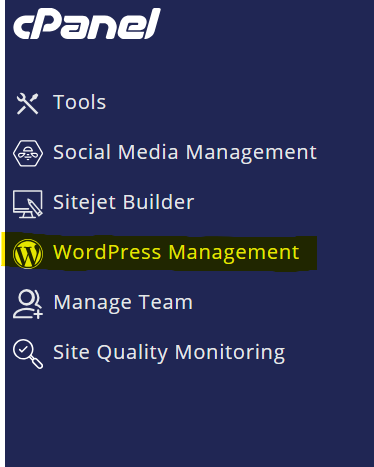
1. click on WordPress Management in your left cPanel menu
2. Once this page loads click on Scan

This will scan your hosting folders for existing Wordpress installations and list them here.
3. Look for any of your actual primary websites (not development or staging) and back them up.
Do this for each main/primary website you have under your account.
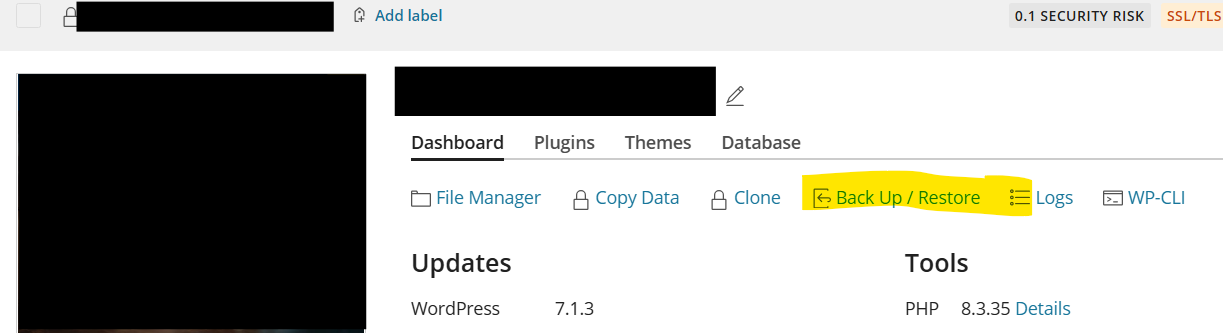
4. Now you've taken care of your risks you can start to prune the legacy sites
Go down the list of sites that aren't primary/main websites (ie; your development and staging sites) and remove them.
If you're not confident to do this yourself please reach out to your web designer or if you would like us to do your web maintenance let us know.